Why your AI product needs bespoke evaluation tooling
If AI quality is your core product, you must own its improvement loop

If you want to improve the quality of your LLM-based product, the industry gives you two main building-blocks. First, gather ground truth by either annotating production samples within a rigid LLMOps platform or use LLM-as-judge. Second, use prompt-optimization frameworks to automatically tweak your system prompts so that it correctly maps a set of inputs to their expected outputs.
Our recommendation is radically different:
If AI quality is mission-critical for your business, as it is for our patient prescreening product, you must own your feedback loop end-to-end. And AI-first programming is the opportunity to build the right tools for that in just a few hours.That means:
Designing a frictionless, fully customized annotation workflow that allows domain experts to explicitly articulate unspoken business policies based on production samples
Systematically integrating them into your system prompts using AI
Evaluating updates with bespoke experiment tooling
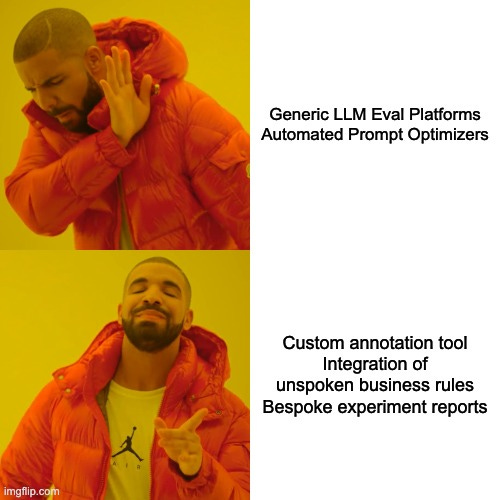
In other words: stop outsourcing your improvement flywheel to generic platforms. Build it yourself.
Let’s unpack why the standard approaches fall short:
Eval platforms: Off-the-shelf evaluation platforms are built on an obsolete software mindset. They force your complex, highly nuanced domain into generic SaaS dashboards that poorly fit your actual use case, actively slowing down your improvement flywheel. To make them work for a majority of use cases, vendors must make compromises and offer a high flexibility, at the expense of usability. The crucial process of improving your AI with a feedback loop is too central to your business to accept a subpar experience.
Automated prompt optimizers: Techniques like DSPy/GEPA or Arize’s Prompt Learning aim at automating prompt optimization by figuring out failure modes and mitigations using AI itself. This is a dangerous illusion of progress because it makes the assumption a frontier model can independently figure out why it got an edge-case wrong. But oftentimes, many distinct reasons could explain a failure. An LLM cannot know where to set the bar between dangerously overfitting to a single sample and creating a rule so broad it breaks everything else, because it’s not a matter of intelligence; it’s a matter of context. Letting an LLM blindly rewrite your prompt is like playing Russian roulette with your system’s logic.
With nowadays reasoning models, when an AI system provides low-quality answers; it is almost always an unspoken policy that hasn’t been spelled out. Verbalizing that policy requires human expert attention on production samples and is what will differentiate your product from tasteless, unhelpful, AI products. It is a high-reward manual effort and this is what you should put all your efforts on. To ensure a truly frictionless process, every element necessary to this feedback loop must be ruthlessly customized to your specific context.
To make our human experts perfectly efficient at this one crucial task, we realized they needed every piece of relevant context on a single screen. Generic tools couldn’t do this. So, we abandoned them. Leveraging AI-first programming offers a unique chance to develop the ideal tools for driving your feedback loop. In this article, we’ll demonstrate how we did it on our own use case.
Our Use Case: Navigating Complex Medical Records To Take Eligibility Decisions
Before diving into the custom tooling we built, let’s set the stage with the actual problem our AI is solving. Our product aims at interpreting raw medical records extracted from Electronic Health Records to evaluate whether a patient is eligible to a clinical trial. Specifically, eligibility criteria are assessed one by one: a multimodal embedding model first extracts the relevant pages of the patient files (ranging from typed notes to handwritten tables and graphs), and a frontier Vision-Language Model interprets them to output an eligibility assessment for that criterion (Eligible, Not Eligible, or Missing Information) alongside a rationale and linked source pages. An eligibility report is shown in our product for every patient and our users (typically Clinical Research Coordinators) can manually confirm or rectify our AI’s assessment before deciding whether the patient is worth being further screened in person. The end goal is to accelerate the identification of eligible patients. We described and demonstrated the impact of this system in detail in Callies et al., 2025, Communications Medicine.
Step 1: Vibe-Coding a Zero-Friction Annotation UI
Those rectifications made by users through our app are our goldmine for improvement. Though, because our system is used across hundreds of clinical sites, we can’t take every user feedback at face-value and we need to carefully review them and decide how to evolve our logic accordingly, if at all.
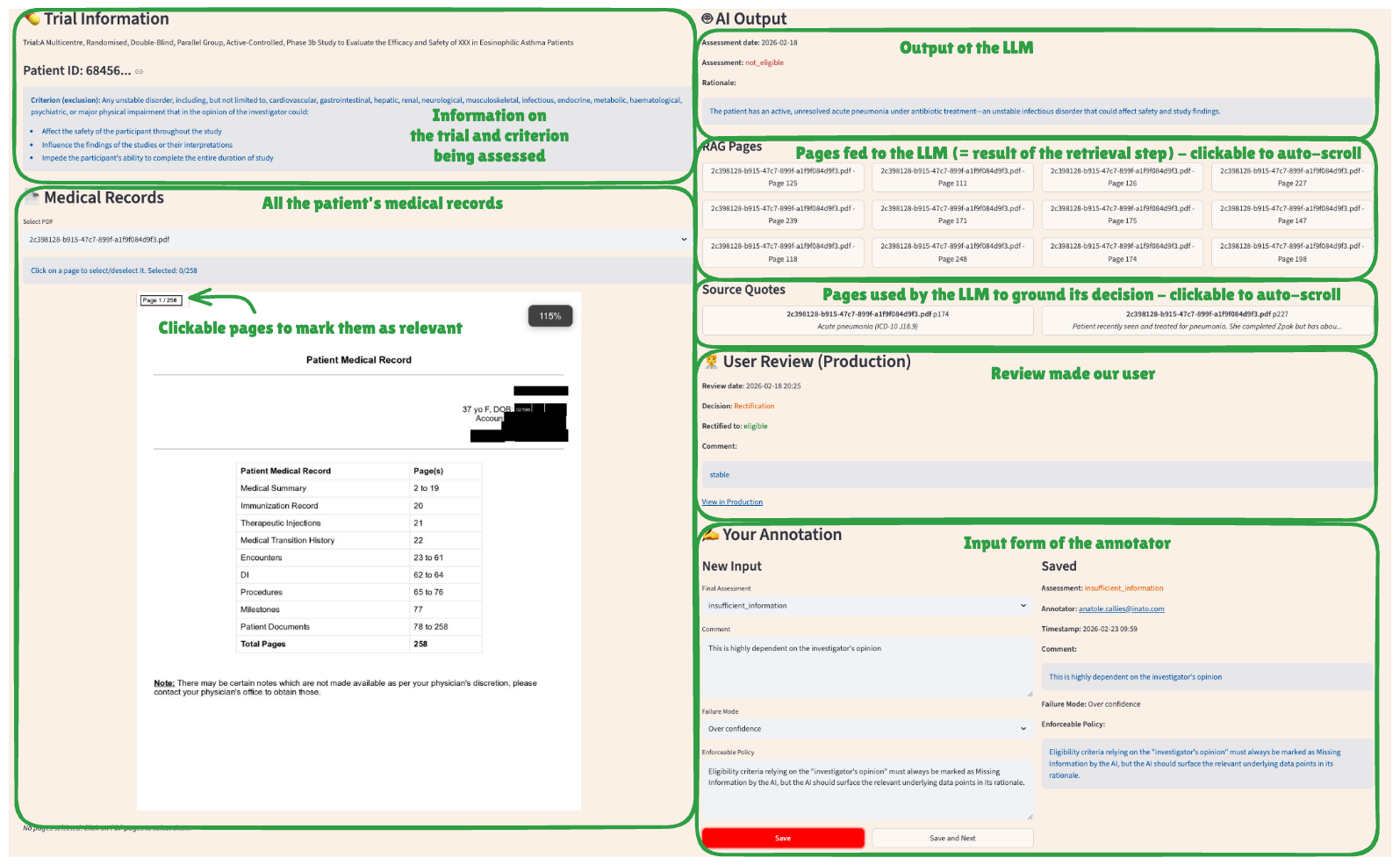
To do this efficiently, we developed a highly tailored Streamlit app (see screenshot below). The effort required to create such a bespoke app has dramatically decreased thanks to coding agents like Claude Code. It took us about half a day to reach the desired end-state. Our annotation tool is a single-screen interface that perfectly maps our exact workflow. For every user-rectified sample, our app loads:
The specific eligibility criterion that was being assessed
The associated clinical trial name
The patient’s full medical record (PDF viewer).
Auto-scroll navigation: Buttons that instantly scroll the PDF to the exact pages retrieved by the retrieval component and/or used as a source by the AI
The comparison: The AI’s original assessment side-by-side with the user’s rectification and comment.
Because the tooling perfectly fits the task, our human annotators can focus entirely on medical logic rather than fighting a UI. They input their final decision, log a specific failure mode (from a dynamically enriched list like “Lack of medical knowledge” or “Overconfidence”), and finally, provide the most critical input of all: an enforceable policy, i.e. an unspoken business rule that was missed by the AI when doing the assessment.
No out-of-the-box annotation tool would allow us to perform that task more efficiently. Only a customized app could fit everything that matters, and only that, in a single page.
The Output: Discovering “Unspoken Policies”
Through our custom app, we discovered critical, highly nuanced policies that no automated prompt-optimizer could have ever deduced. For example:
Subjectivity Handling: Eligibility criteria relying on the “investigator’s opinion” must always be marked as Missing Information, but the AI should surface the relevant underlying data points in its rationale to help the user make a decision.
Missing information handling: When an eligibility criterion is about the presence or absence of a medical condition and that condition is not mentioned in the medical records, the AI should consider: if the patient had this condition, would it likely be mentioned in his medical notes? E.g. Family history is sparsely documented so it should output Missing Information for criteria that require it. On the other hand, a major chronic condition like Diabetes would likely be documented if present, so in the absence of mention, it can assume the patient doesn’t have the condition and answer accordingly.
Step 2: Systematically Integrating Policies via the Claude Code SDK
Once we have gathered these new enforceable policies, we don’t just haphazardly paste them at the end of the system prompt. We leverage AI again to systematically integrate them.
Specifically, we leveraged the Claude Code SDK to directly and interactively iterate on our system prompt. Driven by a meta-prompt, the AI compares the existing prompt with the new policy to integrate and ensures that instructions are non-conflicting, non-repetitive, and logically grouped by theme. The AI proposes changes to the prompt and discusses trade-offs with the AI Engineer until a final update is approved.
Example thread of a prompt improvement session driven by Claude Code:
2026-02-23 11:16:40 Fetching distinct enforceable policies (last 6 days)...
2026-02-23 11:16:43 Found 1 policy
2026-02-23 11:16:43 Processing policy 1/1
2026-02-23 11:16:43 Policy: Missing-condition documentation heuristic
2026-02-23 11:16:43 Backed up prompt to fixed_guideline_prompt.old.md
2026-02-23 11:16:44 Reading target prompt file...
2026-02-23 11:17:07 Comparing policy with existing section “About missing information”
2026-02-23 11:17:07 Result: Rule already present but not strongly enforced
2026-02-23 11:17:07 Proposed strengthened version:
### Critical rule – Missing medical conditions
If a criterion checks a condition that is not mentioned, you must ask:
“If the patient had this condition, would it likely be documented?”
- If yes → assume absent and assess accordingly
- If no/uncertain → answer insufficient_information
Well-documented: major chronic diseases, active diagnoses
Sparsely documented: family history, minor past issues
2026-02-23 11:17:07 Awaiting confirmation to apply changes
Step 3: Ditching Generic Dashboards for a perfect-fit experiment report
With a new system prompt ready, we arrive at the evaluation phase. To perform that evaluation, we wrote an engine that runs experiments by launching many assessments in parallel with various versions of our pipeline. In this article, we compare two versions of our pipeline where only the system prompt differs, but we also use such experiments to assess new foundation models, test alternative retrieval logics etc.
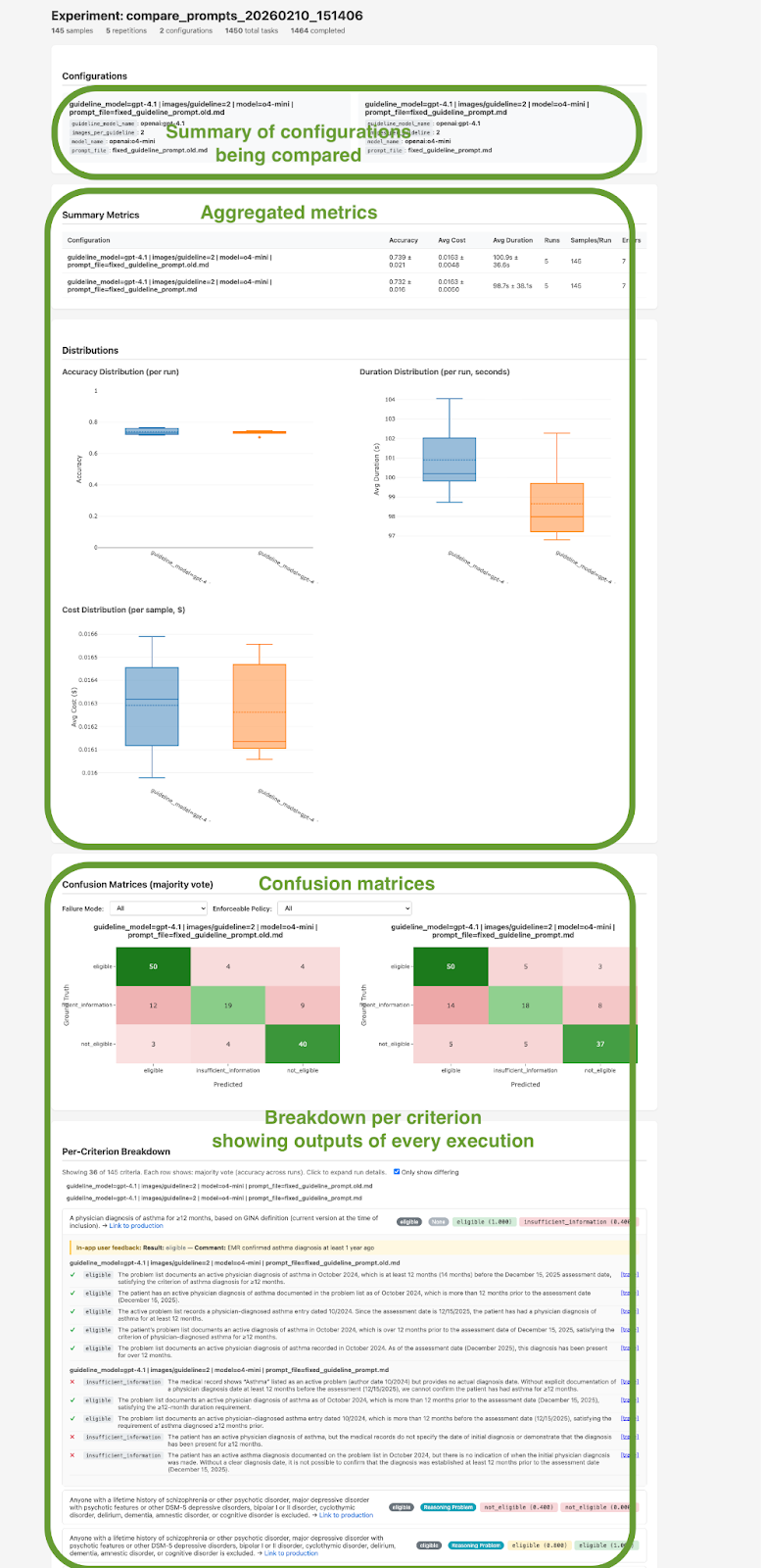
To interpret all these outputs, a generic dashboard showing a basic “accuracy” percentage would be fundamentally opaque and not actionable. We not only need aggregated metrics like average latency, cost, and accuracy, but we also want to see old vs new outputs on every sample, filterable by failure mode and enforceable policies to see where we improved and where we regressed. Here again, to perfectly fit our needs, we vibe-coded a deterministic script that transforms all this data into an actionable HTML report that contains both aggregated and granular metrics (see screenshot below). This bespoke report gives us exactly what we need to make a deployment decision:
Aggregated Metrics: Clear distribution shifts in overall accuracy, token cost, and latency before and after the prompt update.
Per-Sample Deep Dives: The ability to drill down into specific, difficult edge cases.
Multi-Run Stability: A clear view of per-criterion accuracy across N repetitions (typically 10), exposing exactly how variable the AI’s answer and rationale are, and proving whether our newly integrated policies successfully constrained the model’s logic.
Conclusion: Own Your Flywheel
To summarize, our feedback loop involves three frictionless manual efforts, powered by three built-for-purpose pieces of software:
Expert annotators to figure out enforceable policies from production samples → using a bespoke Annotation App displaying all relevant context in a single screen
AI Engineers to control how the system prompt integrates those policies → using an AI assistant powered by Claude Code SDK
AI Engineers to check the efficiency and viability of the update → using a custom HTML Experiment Report.
By using modern AI-coding agents to rapidly generate these apps, we removed all the friction slowing down our feedback loop in just a few hours.
If, like us, the quality of your AI system is central to your business, your evaluation workflow must be uniquely yours.
 |
|